
Citi Mobile®
Citibank N.A.Finance
4.8429.05K Reviews
- Version
- 9.100.0
- Installs
- 10.00M
- Age Rating
- Everyone
Screenshots
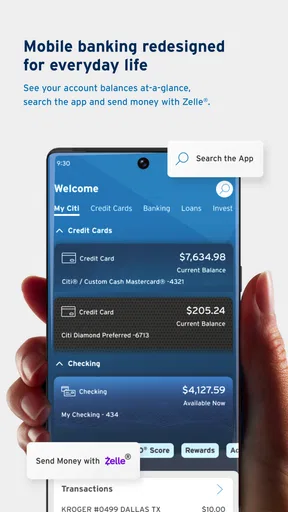
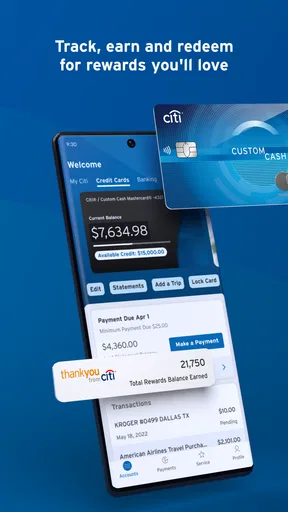
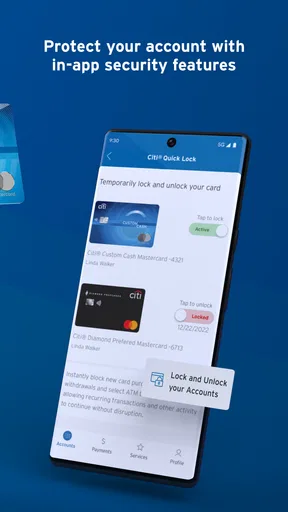
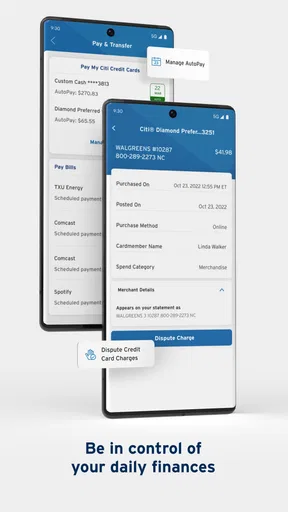
Our Review of Citi Mobile®
 Analysis by Appyee
Managing a bank account from a phone sounds simple until you need to do something important quickly: check whether a payment cleared, confirm a transfer, review a card purchase, or spot activity that does not look familiar. I spent time using Citi Mobile® with that practical question in mind. Rather than treating it as a flashy finance tool, I looked at how well it supports the small money decisions people make throughout a normal week.
Citi Mobile® is a free finance app from Citibank N.A. for Android and iOS. Its purpose is straightforward: put everyday account management in one mobile place. The app is rated for Everyone, runs on operating system version 10 or later, and its current version is 9.97.0. That combination makes it relevant to a broad audience, although the real deciding factor is whether you already use Citi products and want a convenient mobile route into them.
My overall view is positive, but not because a banking app needs to do something entertaining. Its value comes from reducing the need to visit a website or wait until you are at a computer. The strongest case for it is routine control: checking balances before spending, reviewing recent activity, and handling ordinary account tasks while away from home. The weaker case is for someone who wants one neutral app to combine accounts from several unrelated financial institutions.
What I considered before recommending it
Before recommending a banking app, I think about more than whether it can handle a quick balance check: the useful test is whether it fits the accounts and habits a person already has. I also consider how it might complement, rather than replace, broader financial planning. With those boundaries in mind, the next question is what makes Citi Mobile worth returning to after the first few uses.
The first question is whether it matches your banking setup
The most important decision criterion is not the app’s rating or appearance. It is whether Citi is already part of your financial life. If your checking, savings, credit card, or other eligible Citi relationship is the account you need to manage, a dedicated app is usually more direct than trying to work through a general budgeting service. You are dealing with the institution that holds the account, rather than relying on a separate tool to gather information from elsewhere.
If you do not have a Citi relationship, the app is not a useful discovery tool. Installing it will not turn it into a general-purpose wallet for every bank you use. That is the first trade-off I would explain to a friend: Citi Mobile® is designed around Citi customers, not around being a universal financial dashboard.
I also considered how often a person needs mobile access. Someone who checks an account once every few months may be perfectly happy with a browser. Someone who pays bills, watches card activity, or moves money regularly benefits much more from having a dedicated app ready on the phone. The difference is especially noticeable when a purchase needs checking at the point of sale or when you want to confirm a transaction before making another one.
The app is most useful when quick verification matters
My favorite use case is not a complicated financial operation. It is verification. Before paying for a large grocery trip, I can check available funds instead of estimating from memory. After using a card, I can review activity later rather than keeping paper receipts and hoping everything matches. When a recurring payment is due, looking at recent transactions gives me a clearer picture of what has already left the account.
That kind of habit can make a bigger difference than occasional financial planning. The app becomes a short checkpoint between intention and action. I would not rely on it to replace a complete budget, but I would use it to make everyday spending less uncertain.
What matters more than a high store rating
Citi Mobile® has an average rating of 4.8 from around 1.4 million ratings, with roughly 425 thousand written reviews. Those numbers suggest that many people find it useful, and the app has passed the basic test of being established enough for everyday banking. Still, a strong rating cannot tell you whether its account coverage fits your particular Citi products or whether its workflow feels natural to you.
I treat the rating as reassurance rather than proof. Banking is personal: a feature that feels essential to one customer may be irrelevant to another. I would pay more attention to whether the app gives you the access you need and whether you are comfortable making financial decisions from a phone.
Where Citi Mobile® feels strongest
The clearest strength is focus. Instead of asking you to assemble your financial life from several services, it gives Citi customers a direct mobile channel for their Citi accounts. That focus can make routine checks feel less scattered. I can open the app with one purpose, complete the check, and close it without moving through a broader budgeting system full of information I did not ask to see.
This is also where the app compares well with the usual alternatives. A mobile browser can provide account access, but it tends to feel less immediate for repeated use. A general finance app may show a wider picture across institutions, but it can be less direct when you want to inspect a Citi transaction or manage a Citi account. A spreadsheet gives you control over your own records, yet it requires manual upkeep and does not replace direct account access.
For a Citi customer who values a clean separation between banking and budgeting, that distinction matters. I would rather use the bank’s own app to check current account information and a separate method to plan monthly spending than force one tool to do both jobs poorly.
A practical morning and evening routine
Here is the routine in which I found the app most useful. In the morning, I check the account before making a payment or leaving for errands. In the evening, I review the day’s activity and compare it with the receipts in my wallet. This takes only a short visit, but it creates two opportunities to catch confusion while it is still fresh.
The evening check is particularly helpful for shared household spending. If another person uses a card or account that I help monitor, recent activity gives me a more reliable view than trying to remember every purchase. It also makes conversations about money more concrete: instead of asking whether something was paid, I can look at the account activity and work from what is actually shown.
That is one of the less obvious benefits of a dedicated banking app. It does not automatically make someone better with money, but it lowers the effort required to stay informed. Lower effort makes a regular habit more realistic.
Useful habits that are easy to overlook
My first tip is to use the app as a confirmation tool, not merely as a balance display. A balance can look acceptable while several recent transactions still need attention. Reviewing activity after a busy day gives you a chance to notice duplicate-looking charges, forgotten subscriptions, or a payment that has not appeared as expected.
My second tip is to check before and after a major money movement. Looking beforehand helps you understand the starting position; looking afterward helps you confirm that the result matches your expectation. This is a simple two-step workflow, but it is safer than assuming a transfer or payment worked because you initiated it.
My third tip is to keep the app for account control and use another method for long-term planning. I would not create a detailed annual budget inside a banking app unless its planning tools genuinely suit me. Citi Mobile® is more valuable when I use it for current information and immediate account tasks, while a spreadsheet or budgeting system handles categories, goals, and future projections.
A fourth insight is about shared responsibilities. If you help a family member keep track of an account, a mobile banking app can make checking activity easier, but it does not remove the need for clear agreement about who reviews what. Convenience should not become an excuse for casual account sharing or unclear responsibility. I would keep each person’s access arrangements separate and use the app to support communication, not replace it.
What the scale of the app tells me
The app has passed 10 million installs and has been available since September 22, 2011. That long presence and broad reach make it feel like a mature part of Citi’s mobile banking approach rather than a temporary experiment. For a finance app, continuity matters because people want a familiar place to return to when they need account information.
At the same time, popularity does not guarantee that every update will suit every user. Banking apps change over time, and a workflow that feels obvious today may be rearranged later. I recommend judging the current experience by the tasks you personally perform most often instead of assuming that a large user base means zero friction.
Where the experience may slow you down
The main limitation is the same thing that makes the app focused: it is tied to Citi. If you use several banks, investment services, or cards from different providers, you may still need other apps to see the complete picture. Switching between them can be more annoying than using one aggregator, especially when you are trying to understand total spending rather than one institution’s activity.
There is also a psychological limitation to mobile banking. A small screen is convenient for a quick check, but it is not always the best setting for careful financial review. If I need to compare many transactions, investigate a long period, or make a considered financial plan, I prefer a larger screen and a calmer environment. Citi Mobile® helps with access; it does not make complex money analysis effortless.
Another point is that a banking app should not become the only way you think about your finances. It shows the account relationship through Citi’s perspective. That is useful for current account management, but it may not reveal debts, cash, investments, or household obligations held elsewhere. Anyone trying to improve their complete financial position should combine the app with a broader personal record.
When another category is a better fit
I would choose a multi-account finance app for someone whose main goal is an overall household dashboard. That person may care more about seeing accounts from different institutions together than about having the most direct Citi-specific route. The trade-off is that a general tool can add a layer between the user and the bank, while Citi Mobile® stays centered on the Citi relationship.
I would choose a desktop browser for someone who dislikes mobile banking or regularly works with detailed records. A browser can feel more comfortable for extended sessions, particularly when a person wants to read carefully or keep several documents open. The app is better for quick access, not automatically better for every kind of financial work.
I would choose a spreadsheet or dedicated budgeting tool for someone whose priority is forecasting. Planning income, assigning categories, comparing months, and testing savings scenarios require a different style of tool. The app can provide useful current information for that process, but it is not a substitute for a system built around personal analysis.
I would also hesitate to recommend mobile banking as the main solution to someone who is uncomfortable with digital account access. The fact that the app is free does not remove the responsibility of using it carefully. A person who prefers in-person help or paper records may be better served by keeping the app as an occasional supplement rather than making it central to their routine.
What switching to it really involves
Because the app is free, the financial cost of trying it is low. The larger cost is behavioral. You need to install it, sign in, become familiar with where information appears, and decide which checks belong in your routine. If you already use Citi through a browser, the switch is less about changing banks and more about changing the way you reach the same relationship.
I would not switch during a rushed moment before an important payment. Set it up when you have time to read the screens carefully and confirm that you can reach the accounts you expect. Then perform a low-pressure check first. Once the basic path feels familiar, use it for the more valuable habit of reviewing activity regularly.
There is also a record-keeping cost to consider. Moving from paper or a desktop routine to mobile access can make checking easier, but it may encourage quick glances without deeper review. My solution is to assign the app a specific job: quick account checks during the week, followed by a more deliberate review elsewhere when I need a complete picture.
Who should install it
I recommend Citi Mobile® to existing Citi customers who want convenient access to their accounts while away from a computer. It is especially suitable for people who make frequent everyday purchases, monitor card activity, or want a simple way to check their financial position before committing to a payment. The free price and Everyone content rating also remove two common barriers for a general audience.
I would be more cautious with someone who uses Citi only rarely, has most of their money elsewhere, or wants a single dashboard for multiple institutions. That person may get more value from a broader finance app or a desktop-based system, using Citi’s app only when direct account access is necessary.
For families and shared households, I see it as a useful visibility tool, not a complete money-management solution. It can support regular checks and more informed conversations, but a separate shared budget may still be needed to understand the household as a whole.
My recommendation after using it
My recommendation is clear: if Citi is your bank, Citi Mobile® is worth installing. It handles the most important reason to have a banking app—being able to check and manage your account relationship when you are not at a computer—without asking you to turn your entire financial life into one complicated system.
I would not recommend it simply because it is popular, and I would not present it as the best tool for every financial task. Its strength is direct, everyday Citi account access. Its weakness is that it cannot replace a multi-institution dashboard, a detailed budget, or the comfort of a larger screen for careful research.
Used with that boundary in mind, it becomes a practical part of a responsible routine. Check before important spending, review activity after purchases, confirm major money movements, and keep broader planning in a tool designed for it. That is how I would recommend using it to a friend: not as a complete financial command center, but as a convenient and focused way to stay close to your Citi accounts.
Bottom line: Citi Mobile® earns my recommendation for Citi customers who want fast, regular control from a phone. If your needs are broader than Citi, choose a complementary tool rather than expecting this focused banking app to solve every money-management problem.
Privacy and Permissions
See what permissions an app requests and how it handles your data.
- Contacts
- read your contacts
- Location
- approximate location (network-based), precise location (GPS and network-based)
- Phone
- directly call phone numbers, read phone status and identity
- Photos/Media/Files
- read the contents of your USB storage, modify or delete the contents of your USB storage
- Storage
- read the contents of your USB storage, modify or delete the contents of your USB storage
- Camera
- take pictures and videos
- Wi-Fi connection information
- view Wi-Fi connections
- Device ID & call information
- read phone status and identity
- Other
- view network connections, change network connectivity, allow Wi-Fi Multicast reception, full network access, run at startup, control vibration, prevent device from sleeping
Verdict
Strengths of Citi Mobile®
- Quickly view balances, transactions, and account activity in one place.
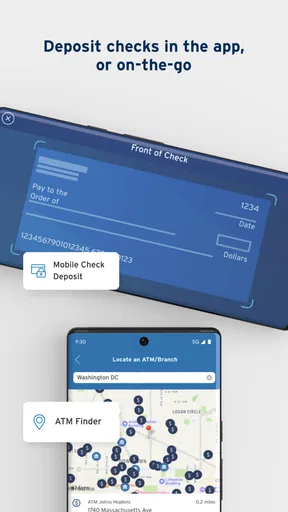
- Mobile check deposit saves a trip to a branch or ATM.
- Card controls help lock, unlock, and manage eligible Citi cards.
- Bill payments and transfers can be handled directly from the app.
- Biometric login offers a faster alternative to entering a password.
Limitations of Citi Mobile®
- Some features vary by account type, card, country, or region.
- Occasional updates may change the layout or require renewed permissions.
- Advanced banking requests may still require contacting Citi support.
- Mobile deposits can have limits and may involve funds availability delays.
- The app requires a stable internet connection for most banking functions.
Similar Picks in This Category
View All
Google Wallet
Google LLC4.3

Airtel: Recharge, Bank & Loans
Airtel4.0

PayPal - Pay, Send, Save
PayPal Mobile4.2

DANA Indonesia Digital Wallet
PT Espay Debit Indonesia Koe4.5

Binance: Buy Bitcoin & Crypto
Binance Inc.4.8

Cash App
Block, Inc.4.7
Frequently Asked Questions
What is Citi Mobile® and what can I do with it?
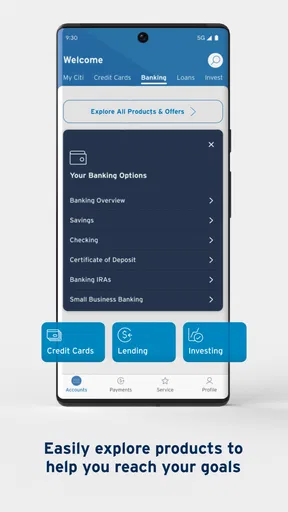
Citi Mobile® is Citi’s official mobile banking app for eligible customers. After signing in, you can typically review account balances and transactions, transfer money between eligible accounts, pay bills, deposit checks where supported, manage cards, receive alerts, and locate ATMs or branches. Available tools can differ depending on your country, account type, and Citi’s current services.
Is Citi Mobile® safe to use for banking and payments?
Citi Mobile® includes security features designed to protect your banking information, such as encrypted connections, secure sign-in, device or biometric authentication, alerts, and fraud monitoring. However, no app eliminates every risk. Download it only from an official app store, keep your phone and operating system updated, avoid public Wi-Fi for sensitive activity, and never share passwords or verification codes.
What do I need to sign in to Citi Mobile®?
You generally need an eligible Citi account, your online banking user ID and password, and access to the phone number or email registered with Citi for verification. Some customers may be asked to complete additional security checks when using a new device. If you have forgotten your credentials or changed your contact details, use Citi’s official recovery options rather than third-party websites.
Can I deposit checks, transfer money, and pay bills through the app?
Depending on your location and account eligibility, Citi Mobile® may let you deposit checks by photographing them, transfer funds, send eligible payments, and pay registered bills. Limits, processing times, fees, supported currencies, and recipient requirements vary. Review the confirmation screen carefully before submitting a transaction, and retain receipts or screenshots until the payment or transfer is fully processed.
Does Citi Mobile® charge fees, and will it work while traveling?
Downloading Citi Mobile® is generally free, but your account agreement may include charges for certain services, transfers, international transactions, expedited payments, or mobile data usage. The app can often be used while traveling if you have internet access, although verification messages, regional restrictions, exchange rates, and security reviews may affect access. Check Citi’s current fee schedule before using international features.
